- Define the term algorithm 3x5 Mr. Rogers definition: A code segment that performs a useful task or solves a problem. By substituting the words "set of instructions or steps" for "code segment" the term algorithm can be applied to numerous problems in everyday life including mathematics.
So, what makes computer algorithms special as compared to say mathematical algorithms? Computer algorithms can do massive numbers of iterations in very short periods of time, enabling new forms of problem solving.
- Define list in abstract terms. an abstract data structure that implements an ordered collection of values, where the same value may occur more than once. The simplest form of list is an array. 3x5
- items numbered
- method for accessing the i th item is defined
-
Define traversal. The process of visiting (examining and/or updating) each node or item in a list.
-
- Compare sequential to binary search. Note: O(----) as shown below is called big O notation and indicates how run time will increase for as the amount of data items = n increases.
sequential search: examines each item in a list in order until it finds the one it's searching for. O(n) run time increases proportional to the number of items searched = n.
binary search: list must be sorted. Uses a divide and conquer technique (20 questions). O(log n) run time increases proportional to the logrithm of the number of items searched, where ( items searched ) = n.
n 2 3 4 5 6 7 8 9 10 100 1,000 10,000 log n 0.30 0.48 0.60 0.70 0.78 0.85 0.90 0.95 1.00 2 3 4
| Essential Question: What is recursion, recursion, recursion, recursion... ? |
Recursion
"To iterate is human, to recurse divine."
(L. Peter Deutsch)
-
- Correctly use recursion. Read the Barron's book write up on recursion. Click here for a simple example of recursion. Relevance: If you can do recursions you can learn to do anything in Comp Sci.
- Must call itself within the method
- align="left">Must alter one or more of its arguments each time it calls itself.
- Must have a means of stopping itself based on the modified argument(s)
- Stores calculated values in a stack and evaluates them after the recursion stops. Uses last-in-first-out (LIFO).
Click here for a recursion example that demonstrates LIFO.
Recursion can be combined with loops. Click here to see an example.
- Correctly use recursion. Read the Barron's book write up on recursion. Click here for a simple example of recursion. Relevance: If you can do recursions you can learn to do anything in Comp Sci.
- Determine the number of iterations a given recursion will have.
|
Reading Homefun:
Homefun (summative/formative assessment):
|
- Relevance: Prior to the second half of the 21st century, the mathematical model particularly in physics was king for predicting outcomes and solving problems. However, there are many problems which can only be solved with algorithms especially in the less mathematical sciences. Even in physics algorithms are required for solving chaos related problems.
| Essential Question: How can Java be used to communicate information? |
Applet Project
-
Use a story board to plan an animation that communicates information via an applet.
-
Use a timer in combination with if-statements to coordinate the elements of a presentation.
example:
create an integer t that increments by 1 each time a timer event occurs. Note: the || operator means or.
if ( t >= someTime || t < aLaterTime) {
// Do something.
}
if ( t >= aLaterTime || t < aMuchLaterTime) {
// Do something different.
}
- Use functional decomposition to successfully complete a moderate-sized software project
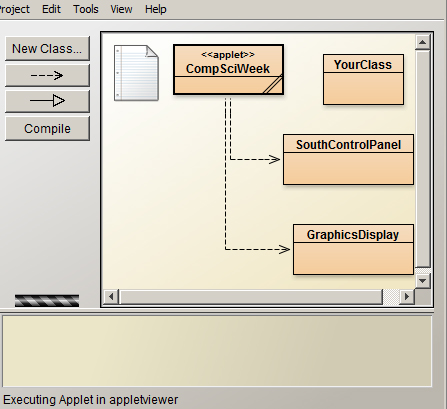
Programming Assignment: Create an informative applet using the basic design presented at right and the specifications outlined in the various classes. The applet will present about a minute of animated content that encourages students to consider learning how to code. The presentation should include factual information such as quotes, job market statistics, etc.
|
|
Extra Credit Opportunity: Create a poster with the theme "We Are the Faces of Computing" according to the specifications contained here.
| Essential Question: What's the difference between style and syntax? |
Chap. 5: Java Syntax and Style
(AP Computer Science Standard: II Program Implementation, III Program Analysis)
-
Correctly use the three forms of comments:
// Single line comment
/* One or more lines of comments*/
/** Javadoc comments*/
Identify reserved words (p. 107).
Distinguish between syntax and style.
syntax: is the defined form the source code must have. Improper syntax will prevent a program from compiling.
style: is the recognized form source code should take to be easily read and understood by other programmers. Improper form wil not prevent a program from compiling.
Correctly use the naming conventions for classes, methods, and fields.
Capitalize the first letter of classes and constructors but not libraries, packages, methods, fields, or variables.
The first character must be a letter & have no spaces in it.
Names can include letters, numbers or the underscore_.
Names should be descriptive.
Method names = verbs, field = nouns
Symbolic constants use all capitals. example: Math.PI , PI is a public symbolic constant that's a field in the Math class.
Correctly indent programs. All code that belongs inside a set of curly brackets should be indented. Henceforth, deductions will be made for improper indentation. Correct indentation is a style issue.
example:
Relevance: A program won't run without proper syntax. Proper style makes the code readable so that it can be modified and maintained.
public class stuff {
public static void main ( ) {
for ( int x = 0 ; x < 12 ; x++ ) {
if ( x == 12 ) {
// some code
- }
}
}
}
- Homefun (summative/formative assessment):
- Read Chap. 5
Read Princeton professor foresees computer science revolution
Write a short paragraph summarizing the Prinston professor's article.
Do Exercises 3, 4, 5, 7, 8, 10 from the Textbook
- Programming Assignment: Lab 5.6 from the Textbook
| Essential Question: How is an expression in a programming language different from the same expression in algebra? |
Chapter 6: Data Types, Variables, and Arithmetic
(AP Computer Science Standard: II Program Implementation, III Program Analysis)
Relevance of the chapter: Computers do not handle numbers in the same way that algebra does. These differences can cause serious errors or enable new possibilities. An understanding of these differences can be critical in many real-world situations.
-
Understand the meaning and use of the equal sign in Java.
Can have only one field or variable on the left side
Means "replaced by", not equals
-
Correctly declare fields, class variables, and local variables or instances.
Fields: Declared inside a class but NOT inside a method. CANNOT be static
Class Variables: Declared inside a class but NOT inside a method. MUST be static.
Local Variables or instances : Declared inside a method.
-
Correctly initialize (set starting values for) fields, class variables, and local variables or instances.
Fields and class variables: Usually initialized by constructors.
Local variables or instances: Can only be initialized locally
-
State the default values used for initializing fields or class variables. Note that these are created inside of a class but not inside of a method.
Numeric types: 0
Objects or instances: null
-
State the default value used for initializing local variables. (Local variable are created inside of methods. There is no default value for local variables.)
-
State the eight types of primitive data types and their sizes in bytes. (p. 129)
Data Type Size (Bytes) Values boolean 1 true or false char 2 Unicode characters byte 1 very short integer short 2 short integer int 4 integer long 8 large sized integer float 4 floating point (number with decimal) double 8 larger floating point
-
Explain why the largest size of an integer or long variable can be a major issue. The size is finite and if the size is exceeded the program will not work.
Data Type Max size int from - 2.1 x 10 9 to 2.1 x 10 9 -1 long from - 9.2 x 10 18 to 9.2 x 10 18 -1 float from - 3.4 x 10 38 to 3.4 x 10 38 double from - 1.8 x 10 308 to 1.8 x 10 308
-
Explain the limitations of precision on floating point data types (float or double) and why these limitations can produce round-off errors. Byte, short, integer, or long have size limitations but are exact numbers, On the other hand, floating point numbers are often not exact. They have a limited number of significant figures, which can be less than the number of decimal places. For example: a number as large as 1.8 x 10 308 would not have 308 significant figures.
Repetitive calculations can produce significant rounding errors. Click here for an example of code that produces significant rounding errors.
-
State the primitive data types which do not have a true zero and explain why this can be a problem. double and float. These are stored as base 2 logarithms and there is no logarithm for zero.
-
Correctly Use:
literal constant - letters in single quotes and numbers.
examples: 'a', 2, 37.5, 'D', 42.005
symbolic constant - declared and initialized using final.
example: final int XXX = 5;
escape sequences (used when outputting Strings. See p.131)
examples of escape sequences
escape sequence
effect
\n creates a new line \t creates a tab \\ outputs \ \" outputs " code example: System.out.print ( "Using \"escape sequences\" \n is fun!" ) ;
| Essential Question: When does a variable cease to exist? |
Scope
-
Understand the term scope (p. 133). Note: the concept of scope is incredibly important to programming in Java. You must consider it whenever you create a variable. As a matter of style, variables should be declared at the top limit of their scope. Click here for an example of scope.
inside the { } of a class
inside the { } of a method
inside the { } of a loop, if, else statement, or any other set of {}
-
Correctly convert numbers and objects into strings and explain why objects need special attention. (An object may have multiple variables or fields of different data types associated with them, hence the output has to be defined in order to understand how it should be done.)
Concatenate to an empty string. Example: System.out.print ("" + 6);
Use toString method for converting objects to strings By default, the toString method outputs an object's class name and memory location. To output something more meaningful the method has to be overridden or in other words, redefined in the object's class (see toStringDemo at right).
Homefun (summative/formative assessment): read Sections 6.1 to 6.5; Exercises 1- 7 p.146-147
| Essential Question: Is 1/2 the same thing as 1.0 / 2.0? |
Integer Math, Autoboxing and Type Casting
Relavance: Computers do not give exact results in the same way that math does. this can lead to significant errors if a programmer is unaware of the possible problems.
-
Use literal constants as either int or doubles (Example: int: 2, double: 2.0).
-
Correctly use the order of operation for arithmetic.
-
parentheses
-
division, multiplication, modulus
-
addition, subtraction
-
-
Perform division using integers and doubles.
Integer division truncates the decimal portion of a number. It does NOT round numbers. Mixed division of integers and doubles upgrades the answer to a double (this is called autoboxing).
Examples: division of integers: 1 / 2 yields 0 division of doubles: 1.0 / 2.0 yields 0.5 mixed division: 1 / 2.0 yields 0.5, 1.0 / 2 yields 0.5
Depending on autoboxing can cause unexpected problems due to order of operation. If you don't want to truncate decimals and do want a double then use double literal constants!
Examples: int & double literal constants: 1 / 2 * 2.0 yields 0 1.0 / 2 * 2 yields 1.0 1 / 2.0 * 2 yields 1.0 only double literal constants: 1.0 / 2.0 * 2.0 yields 1.0
-
Cast variables. This temporarily changes the data type of a variable.
- Example:
- int a = 2, b = 5;
- double c;
- c = ( double ) a / b ; // c has a value of 0.4 . The variable a is temporarily
- // type cast as a double causing b to be autoboxed as a double.
-
- c = a / b ; // c now has a value of 0.0 . Although a was type cast as a
- // double, it returns to being an integer if no longer type cast.
- c = ( double ) ( a / b ) ; // c has a value of 0.0 . Due to order of operation,
- // a/b occurs before the type casting to double.
- Truncate and round numbers using integer division.
- Examples:
- int rounded_Int, x = 8, y = 3 ;
- double rounded_Double, doubleValue =5.1234;
- Normal Rounding:
- // 0.57 rounded to nearest whole number
- rounded_Double = (int) ( ( 0.57 * 10 + 5) / 10) ; // yields 1.0
-
// x / y rounded to nearest whole number
rounded_Int = ( x * 10 / y + 5 ) / 10 ; ( 8 * 10 / 3 + 5 ) / 10 ; ( 80 / 3 + 5 ) / 10 ; ( 26 + 5 ) / 10 ; 31 / 10 ; 3
Rounding Upward--When billing customers, rounding tenths of cents upward can result in millions of dollars of extra profit.
// 0.1 rounded upward to nearest whole number
rounded_Double = ( int ) ( .1*10 + 9 ) / 10) ; // yields 1
// doubleValue rounded upward to nearest whole number
rounded_Double = ( int ) ( doubleValue * 10 + 9 ) / 10 ; // Yields 6
Rounding downward--When paying debts, rounding tenths of cents downward can result in millions of dollars of extra profit. // 2.9, all decimal places rounded downward (truncates) rounded_Double = (int) ( 2.9 ) ; // yields 2
// doubleValue, all decimal places rounded downward (truncates) roundedDouble = (int) doubleValue; Relevance: Handling massive numbers of transactions involving money without losing any funds due to rounding errors is a major issue for international finance and businesses.
- Perform math with characters.
Characters are stored as integers and can be used to perform integer math. (See example code.)
summative/formative assessment (in class): Create 10 practice problems using integer math, order of operation and type casting. Trade with a partner and work the practice problems on paper. Run the code and check your answers.
Essential Question: Why did you learn to find remainders in grade school instead of going straight to long division ? Modulus Math
-
Correctly use various arithmetic operators including:
-
modulus (%) returns remainder: 1 = 5 % 2
-
compound assignment operators (/=, +=, -=, *=, %=)
-
increment/decrement (y++, ++y, y--, --y)
Modulus Examples
1 = 1 % 3 2 = 2 % 3
0 = 3 % 3
1 = 4 % 3
2 = 5 % 3
0 = 6 % 3
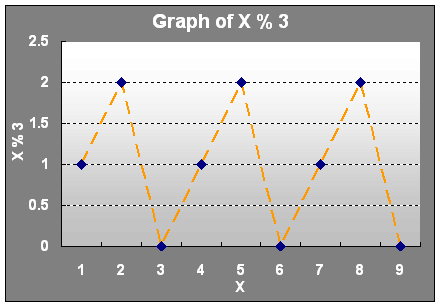
- Use modulus and/or integer math to turn parts of an equation on and off.
example:int offSwitch, x, offPoint = 5 ;offSwitch = ( x % offPoint ) / x ; // Try evaluating this code for values// of x from 1 to 10- Homefun (summative/formative assessment): Read Sections 6.6 to 6.10; Exercises 4, 6, 8, 10, 11, 12 p.147-148, Click here. Work the practice problems on paper and then run the code.
Programming Assignment: Lab 6.10 and Exercise 13 (write a program) p.148
Programming Assignment--Shapes Program: Write a program which uses command line input to input a single dimension in centimeters. Use this dimension to calculate and output the surface area and volume of a cube, sphere, and cylinder along with the correct units. The radius and height of the cylinder are equal to the dimension that was input. Use a separate method for each calculation.
Essential Question: How does a progressive income tax system work and is it a good idea? Note: with a progressive income tax, when a higher rate is triggered the taxpayer only pays the higher rate on income above the amount that triggers the higher rate.
Tax code program: Modify the code provided so that it meets the following specifications:
Input: income in dollars.
Output:
Taxable income in dollars (show only 2 decimal places).
Tax due in dollars (round tenths of cents upward and show only 2 decimal places).
Nominal tax rate in % of income (show only 1 decimal places).
NTR = (taxDue) / (income) *100
Description: The program will round any tenths of a cent upward. "If" statements are not allowed. The program will use only algorithms to calculate taxes. It will use the following progressive tax table:
Income ($) Tax Rate Comments 0 to 19,999.99 00 % This part of income is never taxed
20,000 to 29,999.99 25 % Only income above $19,999.99 is taxed at 25% 30,000 + 35 % Only Income above $29,999.99 is taxed at 35%. Note this is an additional 10% above the 25% tax that kicks in at $29,999.99. Homefun (summative/formative assessment): Summative Assessment: Test Chap 5 & 6 Objectives 1-24
Essential Question: Do we live in a binary world? Chapter 7: Boolean Expressions and Conditional Control
"The best thing about a boolean is even if you are wrong,
you are only off by a bit." (Anonymous)
-
Define conditional control.
-
Correctly use both if and if-else statements. (Be as one with the four Common if-else Errors on p. 156.)
-
Draw flowcharts for both if and if-else statements.
-
Correctly use boolean relational operators. == , > , < , >= , <= , !=
-
Correctly use boolean logical operators. && , || , !
-
Given a set of logic gates write the associated boolean expression (p. 3).
-
Write truth tables for "and", "or", and "xor" gates.
-
Evaluate complex boolean statements using correct order of operators (p. 163).
Highest ^ ^ ^ ^ Lowest ! (unary) - (cast) ++ -- * / % + - == < <= > >= != && || -
Correctly describe and use short-circuit evaluation.
-
Explain and use DeMorgan's Law. The ! operator cannot be simply factored out or distributed because it is an operator not a variable.
!A && !B is the same as !(A || B)
!(A && B) is the same as !A || !B
-
Correctly use if-else-if tables for menus and selection processes like tax tables (see example code)
-
Correctly use switch statements. (Be as one with the six points on p. 197)
-
Homefun (summative/formative assessment):
-
Exercises 1-7, Boolean Worksheet
- Programming Assignments (summative/formative assessment):
- Lab 7.12; exercises 14, 17
- Tax Code Program II: rewrite the tax program entirely with conditional control statements.
- State the 3 elements which must be present for any loop (p. 299).
- initialization
- testing
- incrementing
- Correctly use the following loops (example code):
- int x;
- for (x = 0; x < n; x++) {
- ... code
- }
- int x = 0;
- while (x < n) {
- x++;
- ... code
- }
- int x = 0;
- do {
- x++;
- ... code
- } while (x < n);
- double y [ ] = new double [n];
- for (double i: y) {
... code
} - State which loop always runs at least once. do-while
- State the most appropriate loop(s) to use when the number of iterations are known (for-loop) and when they are not known (while-loop).
- Appropriately use break and return statements for ending loops.
- Correctly use loops for manipulating and outputting values in arrays. (example code)
- Correctly use nested loops.
- State the number of times each loop runs when using loops or nested loops. (example code)
- Be aware that a break statement in an inner loop will only break out of the inner loop. (example code)
- Use loops for the following programs:
- even/odd numbers
- factorials
- fibonacci numbers
- additional example code showing the power of using loops: The first program shows a nested loop used for outputting a type of multiplication table. With some modifications, the second program shows a more sophisticated multiplication table .
- Exercises 8, 9, 13
- Lab 8.6; Exercise 10, 11, 12
-
Recognize literal strings. characters enclosed in double quotes, example: "This is a literal string"
-
Be familiar with the 2 most common of String's 9 constructors.
- String ( )
- String ( String s )
-
Be aware that Strings are immutable objects.
- Understand how Strings are initialized.
- String s1 = ""; // s1 is set to an empty String
- String s2 = new String(); // s2 is set to an empty String
- String s3; // s3 is set to null
-
Be aware that calling a String method with a String set to null will give compiling errors. (An empty string initialized to "" is not the same thing as a string initialized to null.)
-
Correctly use common String methods (See table on p. 265.)
-
length ( )
-
charAt ( pos ) // Note that characters are counted starting at 0.
-
substring ( pos )
-
substring ( Pos1, Pos2 ) // returns a substring starting with the character at Pos1 and ending with the character at (Pos2 - 1)
-
compareTo ( s2 ) // returns neg int if s1 <s2, 0 if s1 = s2, pos int if s1>s2
-
compareToIgnoreCase ( s2 ) //returns neg int if s1 <s2, 0 if s1 = s2, pos int if s1>s2 ignoring case
-
equals( s2 ) // returns a boolean true or false
-
equalsIgnoreCase ( s2 ) // returns a boolean true or false ignoring case
-
indexOf ( ch ) // four types
-
lastIndexOf ( ch ) // four types
-
trim ( ) // removes white space characters from beginning and end of string
-
replace ( oldChar, newChar )
-
toUpperCase ( )
-
toLowerCase ( )
- Correctly use the various ways of doing concatenation (adding Strings). (p. 266)
- yourString += str;
- yourString = yourString1 + str;
- yourString.concat (str);
-
Correctly use relational operators with Strings. (p. 268)
-
CANNOT use == , != , < , >, <= , >=
-
CAN use: (Note that a string instance must call the method and a second string must be entered as and argument to compare the 2 strings.)
- s1.equals ( s2 )
- s1.equalsIgnoreCase ( s2 )
- s1.compareTo ( s2 ) methods
- s1.compareToIgnoreCase ( s2 )
- Correctly convert numbers into Strings and Strings into numbers.
examples:
int yourInteger = Integer.parseInt ( yourString ) ;
String yourString = String.valueOf ( yourNumber ) ;
-
Explain the term wrapper class. Wrapper classes allow primitive data types to be converted into objects or vice versa.
Since ArrayLists need to contain objects, wrapper classes allow primitive data types to be stored in ArrayLists.
-
Correctly use wrapper class methods. (sample code, also see p.275)
Integer ( integerNumber ) Constructs a newly allocated Integer object that represents the specified integerNumber. Example: Integer currentInterger = new Integer (12 ) ; intValue ( ) Returns the value of this Integer as an int . Example: int x = currentInterger.intValue ( ) ; - Correctly use the StringBuffer class (p. 278).
- Exercises 1-6
- Examine and run the compareToDemo program and write a short description of what the compareTo method returns. On the next test, given two strings s1 and s2, you should be able to state the exact number returned by s1.compareTo (s2). (Assume that you have an ASCII table.)
- Modify the above code to run with compareToIgnoreCase and write a short description of what the compareTognoreCase method returns. On the next test, given two strings s1 and s2, you should be able to state the exact number returned by s1.compareTognoreCase (s2). (Assume that you have an ASCII table.)
- Programming assignments (summative/formative assessment):
- Write a program that:
- inputs 2 strings using command line input.
- Output the length of both strings, the 3rd character in both strings.
- Test the strings to see if they are the same and output whether they are. Concatenate the two strings and output the result.
- Output any capital letters in the concatenated string along with their position.
-
Write a program that inputs a string using command line input and tests it to determine if it's a palindrome.
- Write a a program that inputs 2 strings using command line input and outputs them in alphabetical order.
-
Correctly declare and initialize arrays.
-
int scores [ ] = new int [5] ;
-
int scores [ ] = { 93, 67, 99, 87, 91 } ;
-
State the default values when initializing arrays
-
numbers = 0
-
boolean = false
-
objects = null
-
Know that once declared and initialized, the size of an array cannot be changed.
-
Know that the elements of arrays are numbered starting with 0. These elements can be randomly accessed using the indices or subscripts.
-
Correctly use the array length field. example: array.length, note that strings use length ( )
-
Be aware that arrays are always passed to methods by reference. When an object is passed by reference, the memory address of the starting point of the array is passed into the method. Any work done on the array by the method continues to exist after the method finishes running. It's not necessary to return an array to get values out of a method.
-
Correctly declare and initialize 2D arrays.
- final int ROWS = 2 ;
- final int COLS = 3 ;
- double name2DArray [ ] [ ] = new double [ROWS] [COLS] ;
- or
- double name2DArray [ ] [ ] =
- {
- { 0.0, 2.7, 5.6 } ,
- { 4.3, 1.4, 7.2 }
- } ;
-
Be aware that the first dimension in a two dimension array is considered the number of rows while the second dimension is the number of columns.
-
Correctly use the length field to find the number of rows and columns.
-
twoDArray.length returns the number of rows
-
twoDArray[0].length returns the number of columns
-
Be aware that arrays with more than 2 dimensions can be declared.
-
Correctly use parallel arrays.
-
Correctly use ArrayList. example code
-
State the advantage of using ArrayList. Can expand and contract as needed
-
Be familiar with ArrayList's constructors and methods (see page 331).
-
Be aware of the pitfalls of using ArrayLists. They can only store objects or instances and require more memory than arrays. Manipulating data in an arrayList generally requires more processing time than in an array, but this is usually not a significant problem with up to date computer hardware.
-
Describe how classes and arrays are key elements used to form data structures.
-
Describe why abstraction is an important theme in data structures.
-
Be as one with Chapter 2 of GridWorld.
- Homefun: Exercises 1-5;
- 12.1 Simple Data Base Program
- Create a program with two classes, one called Company and the other called Employee.
- The Employee class will have 3 fields: the 1st holding first names, the 2nd holding last names, and the 3rd with the corresponding salary for each employee. The Employee constructor will have 3 parameters, one for setting the initial value of each field.
- In the Company class, the main method will create an ArrayList: containing 4 Employee objects. Use an output method to concatenate the first and last names, and output the data in two columns as shown in the example:
-
Name Salary $1000/yr
-
Herb Bobo 12
-
Jane Cool 27
-
Juan Smith 200
-
Betty Taylor 142
- 12.2 2-D Array Output
- Create a program with a class called Alphabet with 3 local (inside main method) 2-dimentional arrays: each will contain a large-sized letter respectively A, B, and C. Use a separate method to output the letters alphabetically in a column with A at the top.
- GridWorld: Read Chapter 2, Exercises 1-4
Summative Assessment : Test Chap 11 Objectives 1-11
Essential Question: How can we access and perform similar manipulations on millions of volatile pieces of similar information without having to create millions of lines of code? Chapter 8 Iterative Statements (Loops)
Relevance: Many if not most algorithms require loops. Loops are basic to all forms of computer science.
Note, that for-loops, while-loops, and do-while loops can all perform the same tasks. the choice of loop type is ultimately a matter of programming style. (example code)Loop Type
Example Comments for Used when the number of times the loop needs to run is known
while Used when the number of times the loop needs to run is not known
do...while Used when the number of times the loop needs to run is not known but must be at least once.
foreach Always runs exactly n times where n = size of list. Starts at list index of 0 and increments upwards by one
return: ends both the loop and the method (or causes the method to rerun itself in the case of recursion).
break: ends the loop it is contained in. With nested loops if the break statement is in the innermost loop it will end only that loop.
Homefun (summative/formative assessment):Even numbers: write a program that outputs n even numbers. Use command line input to input the value of n. output 1 even number per line. Turn in a printed copy of your code.
Fibonacci Numbers: write a program that outputs n fibonacci numbers. Use command line input to input the value of n. Output 1 fibonacci number per line. Turn in a printed copy of your code.
1, 1, 2, 3, 5, 8, 13, 21 ... or f(n) = f(n -1) + f(n -2)
Prime numbers: write a program that outputs n prime numbers. Use command line input to input the value of n. output 1 prime number per line. Turn in a printed copy of your code.
Write the output for the mystry code: Run the code and check your answers. Turn in written answers to the questions in the code.
Programming Assignment (summative/formative assessment):
Summative Assessment: Test Chap 8 Objectives 1-12
Essential Question: How can we store and manipulate not just numbers but human text in a computer program? Chap. 10 Strings
Relavance: Strings allow human languages to be stored and manipulated in a computer.
See example code VowelFinder
Primative Wrapper boolean java.lang.Boolean byte java.lang.Byte char java.lang.Character double java.lang.Double float java.lang.Float int java.lang.Integer long java.lang.Long short java.lang.Short void java.lang.Void Homefun (summative/formative assessment):
Summative Assessment: Test Chap 10 Objectives 1-13
Essential Question: How can we store millions of volatile pieces of similar information without having to create millions of variables in a computer program? Chap. 12 Arrays and ArrayLists
Relavance: Arrays and ArrayLists are key ways that data is stored and manipulated in a computer
given : int incomes [ ] = new int [ 5 ] ;
example of a method's parameters : someMethod ( int inc [ ] ) ;
example of calling the method : someMethod ( incomes ) ;
Note: the [ ] in the example indicates that an array is being passed to the method. Do not put the size of the array in the brackets. Do not use the [ ] when using an array as an argument. (See example code.)
Next, output the total of all salaries. Use a random number generator to fire two employees. Remove them from the ArrayList then add a new employee called Bob Newguy with a salary of $200,000. Again, output a table with the names of the current employees and their salaries. Also output the total of all salaries.
Note: You need to write the letters on graph paper or in an Excel spread sheet in order to understand how many spaces are needed. To understand how the arrays should be initialized look at chapter 10 objective 7 above. You do not need to reproduce the grid lines in your program's output.
0 1 2 3 4 5 6 7 8 9 10 0 A 1 A A 2 A A 3 A A A A A A A 4 A A 5 A A Summative Assessment: Test Chap 12 Objectives 1-16
Essential Question: How can you succeed on the semester exam?